
SNMP Overview
Simple Network Management Protocol (SNMP) is a protocol for managing and monitoring network devices efficiently. CommBox EdgeOS supports SNMP read functionality, allowing network administrators to use SNMP queries to extract device information and monitor network performance.
This guide briefly describes the SNMP functionality and explains how to utilize the supported Management Information Base (MIB) tables for effective network management.
Supported SNMP and MIBs
SNMP Versions: CommBox EdgeOS supports SNMPv2c
MIBs: CommBox EdgeOS supports standard system and interface MIBs. These MIBs define a set of variables that CommBox EdgeOS exposes for SNMP operations, such as querying system information or interface metrics.
Configuring SNMP on CommBox EdgeOS
-
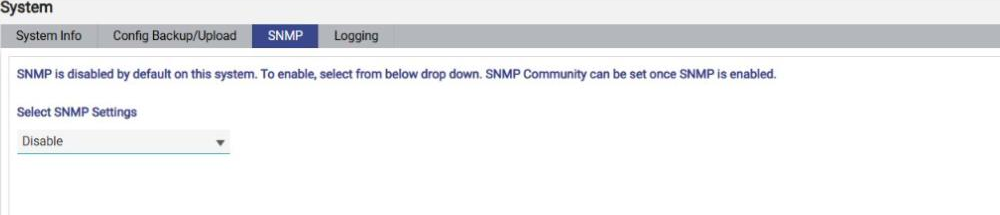
Select System from the side menu bar and click the SNMP tab. The screen displays the message SNMP is disabled by default on this system. To enable, select from below drop down. SNMP Community can be set once SNMP is enabled.
-
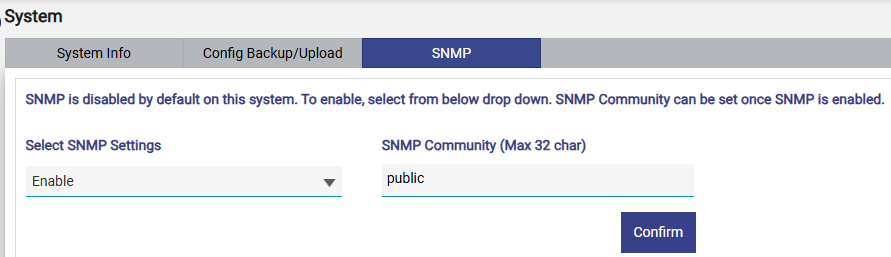
In the Select SNMP Settings dropdown, select Enable (the default is Disable).
-
Set the Community String. The community string acts as the password that allows read access to the device's MIB information.
MIB Object Identifier (OID) Tables
No specific MIB file is provided for download, as the standard system interface MIB is supported. The following table lists specific identifiers available from the CommBox EdgeOS system.
|
System MIB OID |
Details |
|
System Type |
|
|
System uptime |
|
|
KVH NOC Contact |
|
|
SiteName |
|
|
Device Name (if configured) |
|
|
Device Serial Number |
The following table lists the specific interfaces available:
|
ifMIB OID |
Details |
|
All the configured/available WAN/LAN/Management interfaces are listed Index 1x - LAN Index 3x - WAN and WAN sub interfaces Index 5x - Management Interfaces |
|
|
Interface Alias Name |
|
|
All the interfaces will be reported “ethernet” (6), built-in WiFi and LTE interfaces will be reported as “others (1)” |
|
|
defaults to 1400 |
|
|
Applicable for ethernet interfaces. (String) |
|
|
MAC address for ethernet interface |
|
|
Enabled/ Disabled status of the interface |
|
|
(1) Up - Interface Up / Internet Up (2) Down - Interface Down / No Internet (3) Interface Up/No Internet |
|
|
Interface Tx Bytes |
|
|
Interface Rx Bytes |